
If your plugin lives on WordPress.org, translations are a solved problem. Volunteers translate on translate.wordpress.org, language packs get built for you, and every site picks them up under Dashboard > Updates.
Sell a premium plugin, though, and that whole pipeline disappears. You end up bundling .po and .mo files in every release, shipping a new version just to fix a typo in German, and hoping customers don’t overwrite their own tweaks when they update.
I got tired of that, so I built Language Pack Server for GlotPress. It gives plugins and themes hosted anywhere the same translation experience WordPress.org plugins get.
What it does
The plugin turns any WordPress site running GlotPress into a language pack server, built in the same style as WordPress.org. Translators work in GlotPress as usual. The plugin packages their work and serves it to your customers’ sites.
- WordPress.org-style language packs. Each locale is built as a ZIP of standard
.poand.mofiles. - Block editor strings included. If your strings appear in JavaScript files, it compiles the JED 1.x
.jsonfiles too, so Gutenberg blocks get translated. - Automatic builds. Packs rebuild when translations are saved, or once a day through WP-Cron. If nothing changed since the last build, the rebuild is skipped.
- A translation threshold. Only locales above a set percentage (90% by default) get a pack, so customers never receive a half-finished translation.
- A POT import endpoint. Your build process can push a fresh
.potfile to GlotPress on every release, with no manual uploads. - An admin dashboard. See every project’s progress and pack status (Generated, Needs Update, Not Generated). Build or delete packs by hand when you need to.
- A WP-CLI command.
wp gp-language-packs generatebuilds packs from the command line, for one project, one locale, or everything.
How it works
Your customers never touch a translation file. Packs arrive through the same update screen they already use for WordPress.org plugins.
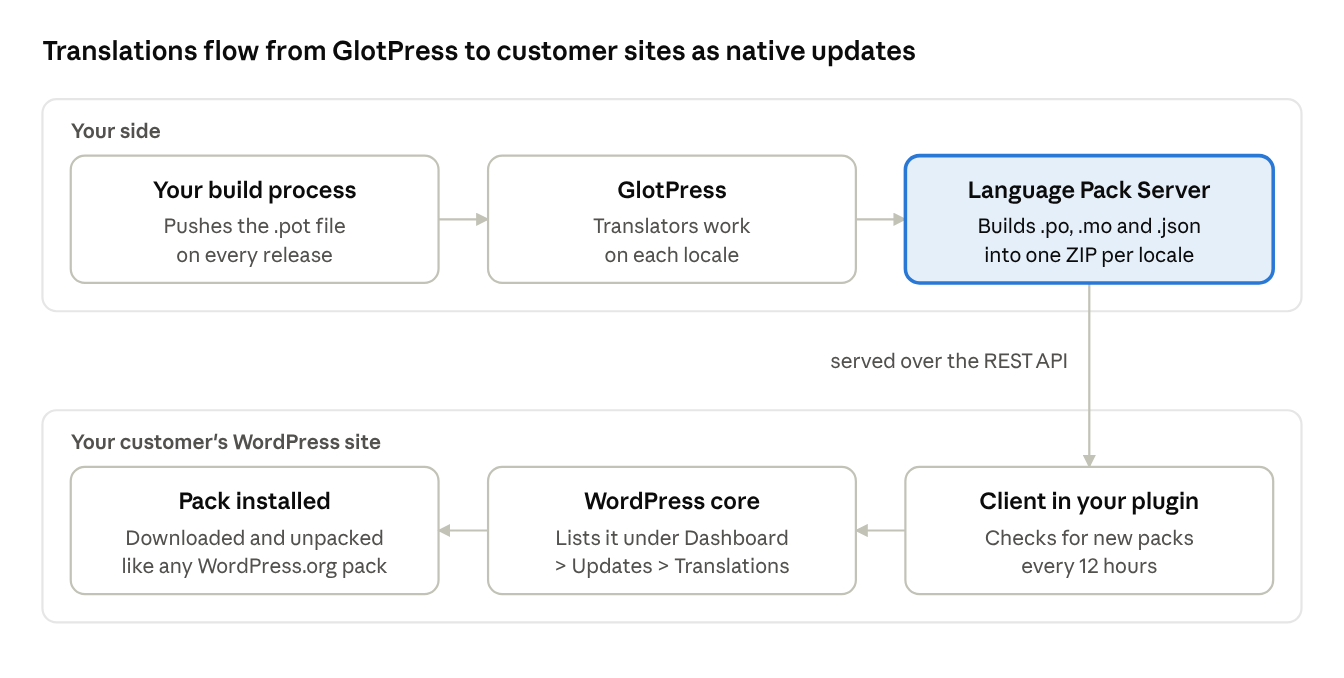
Your build pushes new strings to GlotPress, translators fill them in, and the server builds a pack for each locale that passes the threshold. The client in your plugin checks for new packs and hands them to WordPress core, which installs them.
Getting started
Setup has two halves: the server, which you run once, and a small client you bundle in each plugin or theme.
On your GlotPress site
- Install and activate GlotPress and Language Pack Server for GlotPress. The server needs PHP 8.0 and WordPress 6.9 or later.
- Create a GlotPress project for your plugin, set its Text domain, and import its
.potfile. - Let translators get to work. Once a locale passes the threshold, its pack is built automatically.
Set the text domain. WordPress unzips a language pack exactly as it is and loads translations by file name, {text-domain}-{locale}.mo. That file name is the only way it can tell which plugin a pack belongs to. So the files inside each pack have to be named after your plugin’s text domain, not the GlotPress project slug. When the two differ (for example, the project name-your-price has the text domain wc_name_your_price), fill in the Text domain field on the GlotPress project form. If they match, leave it empty and the slug is used. Changing the field rebuilds that project’s packs straight away.
To keep strings in sync on every release, have your build tool push the new template to the import endpoint:
curl -X POST -u "import_bot:application_password" \
  -F "file=@languages/my-plugin.pot" \
  "https://your-server.com/wp-json/gp-language-pack-server/v1/projects/my-plugin/import"Code language: JavaScript (javascript)
Use a dedicated, non-admin user with an Application Password for this, and keep the credentials in a CI secret. For alpha, beta, and RC builds, add additive=1. That adds new strings for translators without removing any that the stable release still uses.
In GitHub Actions, that becomes one step in your release workflow. It runs on every tag and reads the credentials from repository secrets:
- name: Upload POT to GlotPress
  if: startsWith(github.ref, 'refs/tags/')
  env:
    GP_USER: ${{ secrets.GLOTPRESS_USER }}
    GP_APP_PASSWORD: ${{ secrets.GLOTPRESS_APP_PASSWORD }}
    # Tags like 1.2.0-beta.1 import additively; stable tags do a full sync.
    ADDITIVE: ${{ contains(github.ref_name, '-') && '1' || '0' }}
  run: |
    printf 'user = "%s:%s"\n' "$GP_USER" "$GP_APP_PASSWORD" |
      curl --fail-with-body -sS -K - -X POST \
        -F "file=@languages/my-plugin.pot" \
        -F "additive=$ADDITIVE" \
        "https://your-server.com/wp-json/gp-language-pack-server/v1/projects/my-plugin/import"Code language: PHP (php)
Piping the credentials into curl with -K - keeps the password off the command line, so it never shows up in the process list or the job log. Generate the .pot file in an earlier step, for example with wp i18n make-pot.
In your plugin or theme
Add the client package with Composer:
composer require helgatheviking/gp-language-pack-clientCode language: JavaScript (javascript)Then start it from your main plugin file:
use HelgaTheViking\GPLanguagePack\Client as GPLanguagePackClient;

new GPLanguagePackClient(
	'https://your-server.com', // Your GlotPress site
	'my-plugin',               // GlotPress project slug
	'my-plugin',               // Text domain
	'plugin'                   // 'plugin' or 'theme'
);Code language: PHP (php)
Not using Composer? You can copy the single Client.php file into your project and require it instead.
The client stays light. It checks your server at most every 12 hours and only asks about languages the site actually uses. It also never overwrites a .mo file the site owner has edited by hand.
Try it out
Language Pack Server for GlotPress is free and open source under the GPL. Grab it, along with the full docs, from GitHub. The client lives in its own repo.
If you sell plugins or themes and you’ve been hand-bundling translation files, give it a spin. Found a bug or have an idea? Open an issue on GitHub. I’d love to hear how you’re using it.
Leave a Reply